
The Power of a Company Brain
Every chat starts from scratch, until you write down your knowledge once and for all. That's how we built the company brain at co-Founded by AI: 55 markdown files in a shared folder that every model reads. Seven steps, and what they deliver.
Every new chat with AI starts from scratch. Jurriën explains the positioning, pastes in the pricing, explains who the target audience is and what tone fits. Twenty minutes later the model is sharp and he gets his first answers. The following week, all over again in a different window, with a different model, with slightly different wording. Meanwhile Geert-Jan is doing something similar. In his AI environment, with his skills and memory.md.
We kept that up for a couple of months. But we were working past each other. Then we built a company brain: one shared folder with plain text that every model reads from. Today there are dozens of documents and images in it. Every AI session starts there. Every AI session ends there. Regardless of whether we use Claude, Codex, Code or another tool.
A folder, not a tool
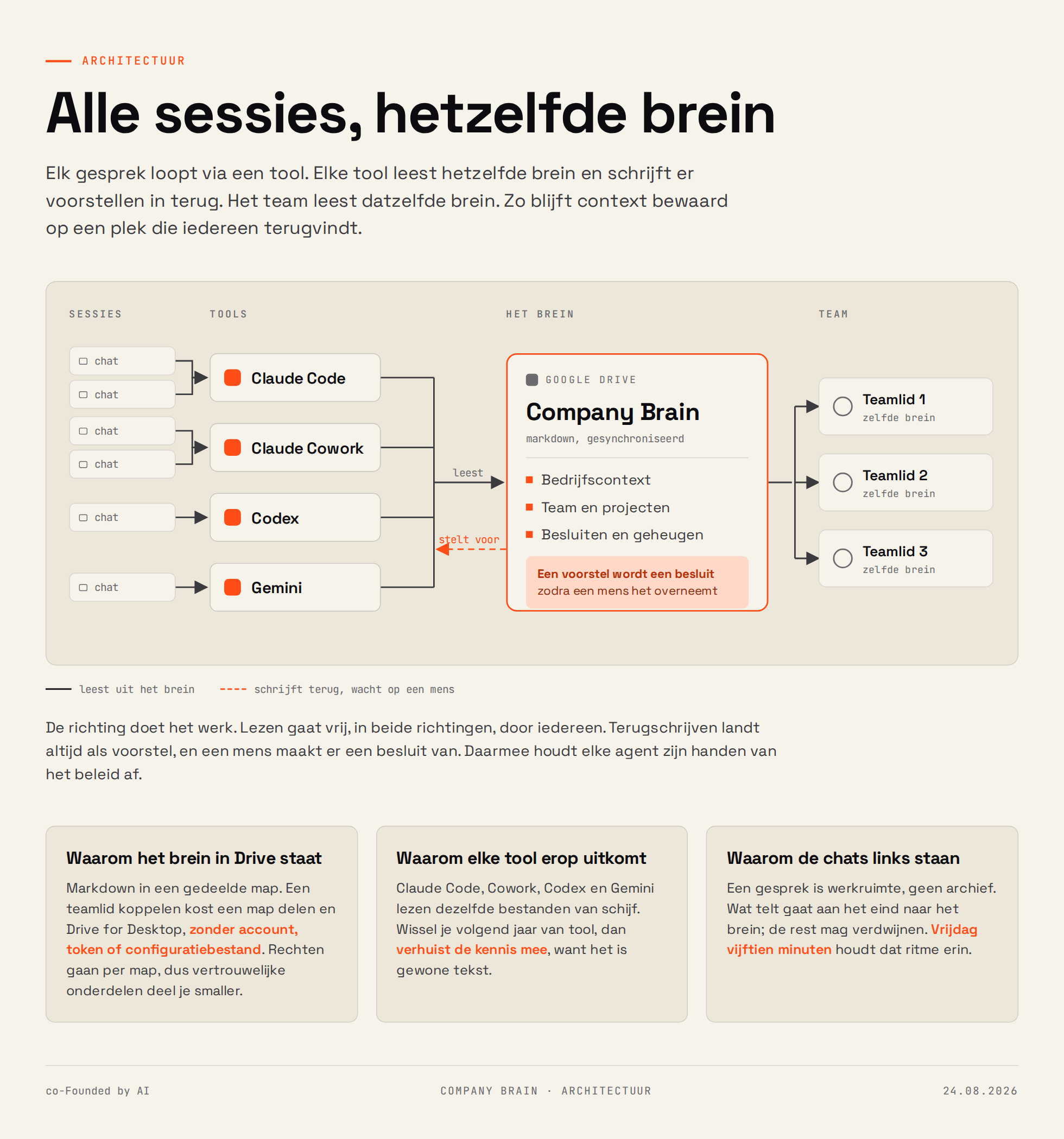
The brain is a folder in Google Drive. Markdown, folders with numbers in front, frontmatter at the top of each file. That's all there is.
That simplicity is the strength. Claude Code reads those files from disk. Claude Cowork does too. Codex and Gemini do too. There's one version of the positioning, and it lives in one place. If someone switches to a different model next year, the knowledge moves with it, because text reads everywhere. If someone needs to get up to speed on our business: the brain contains the truth and the agreements we make together.
The structure is intentionally boring. 00-core contains what applies to everything: positioning, founders, decisions, lessons learned. 10-cofounded carries the brand, 20-design the tokens, 30-minagi the product, 40-ambassadors the two digital faces, 50-media the image policy, 60-ops the stack and the numbers, 70-methods the ways of working. 90-archive preserves raw material and _inbox holds decisions waiting for a resolution. A number up front keeps the order stable in every explorer and in every tool.
Onboarding a team member costs a folder share plus Drive for Desktop. Beyond that there's nothing: account, token and config file stay out of the way. Permissions run per folder, so you can share confidential parts differently from the rest of the information.
What it delivers
Three things, and they reinforce each other.
Consistency. The tone of voice, the pricing, the dividing line between co-Founded by AI and minagi: every model uses the same version. A contradiction stands out, instead of slipping unnoticed into a LinkedIn post. That's a nice feeling.
Speed. A session starts by reading and launches at three-quarters capacity. The time that used to go into context explanation now goes into the work itself.
Memory. Decisions and lessons are recorded, with the reasoning included and with what they replace. That material feeds the week log, the column and (at a later stage) the book.
The third point surprises the most. A company forgets its own reasoning faster than you'd think. Why did that vendor drop out, why is that price set at this amount, why is the product called that: half a year later everyone knows the outcome and nobody knows the reason. A decision log that includes reasoning with every line preserves that reasoning, and also delivers a clear story for the outside world.
The steps we took
1. Choose a place that syncs
Google Drive, with the folder set to "available offline". Without that setting there's a placeholder on disk that an agent can't do anything with. If the folder is under "Shared with me", create a shortcut to your own My Drive, otherwise Drive for Desktop won't sync it.
2. Create one entry point
BRAIN.md is the starting point. Truth hierarchy at the top, below that a routing table: what kind of work asks for which files. If you're writing a week log, you load 10-cofounded/ plus the decision log. If you're working on product copy, you load the minagi folder with the boundaries. That way a model reads three files instead of fifty-five.
That table saves more than time. A model that reads everything at once loses focus and pulls the wrong paragraph. A model that reads precisely the three relevant files answers with the words you wrote yourself.
3. Establish the truth hierarchy
Two files will contradict each other eventually. This hierarchy solves it: the decision log always wins, then the dividing line, then the subject file, then everything outside of that. The inbox sits at the bottom, below everything.
That one paragraph prevents most arguments with and about a model.
4. Put frontmatter at the top of every file
Six fields: scope, audience, language, owner, status and updated. scope: cofounded never flows through to product copy. audience: confidential never appears in publication. status: needs-input means ask questions.
That way a model does self-censorship at the right place, at the right time, without you repeating it per task.
5. Let models write only to the inbox
This is the most important rule of all. Everything a model concludes lands as a new file in _inbox/, with the date in the name. Existing subject files stay untouched.
Two reasons. The first is technical: Drive reports a collision rarely and quietly makes a second version, decisions (1).md. A new file per note never collides. The second is substantive: a model's suggestion only counts as a decision after a human adopts it. AI advises, humans decide. Otherwise an agent writes policy on Tuesday that comes back as truth on Thursday.
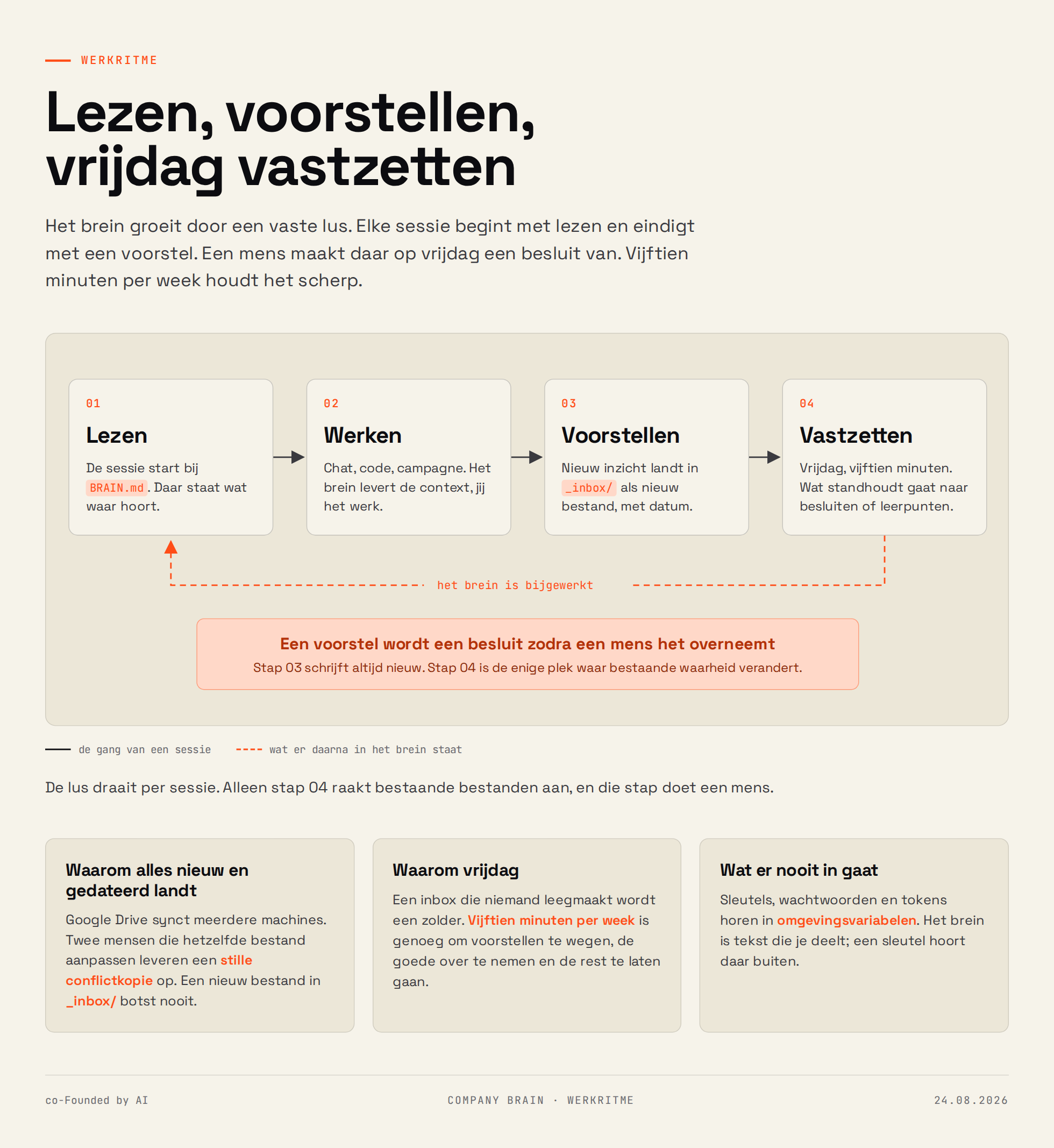
6. Distill on Friday, fifteen minutes
Empty the inbox. What's a decision goes to the decision log, with the reasoning and with what it replaces. What's a fact goes to the subject file. What's a lesson learned goes to lessons. The rest goes away.
Fifteen minutes a week keeps it sharp. Without that ritual the brain sinks into disarray within two months and the inbox bursts at the seams. Bonus: the decisions that surface contain exactly the content for that week's week log.
7. Build a reading page
A folder with dozens of markdown files reads fine for a model and awkwardly for a human. That's why there's a brain.html alongside it: one page that displays the entire brain as an accessible map. Click a ring and the documents in that folder expand. Click a document and the text appears on the right, with the frontmatter as labels above. Everything searchable via a powerful search function.
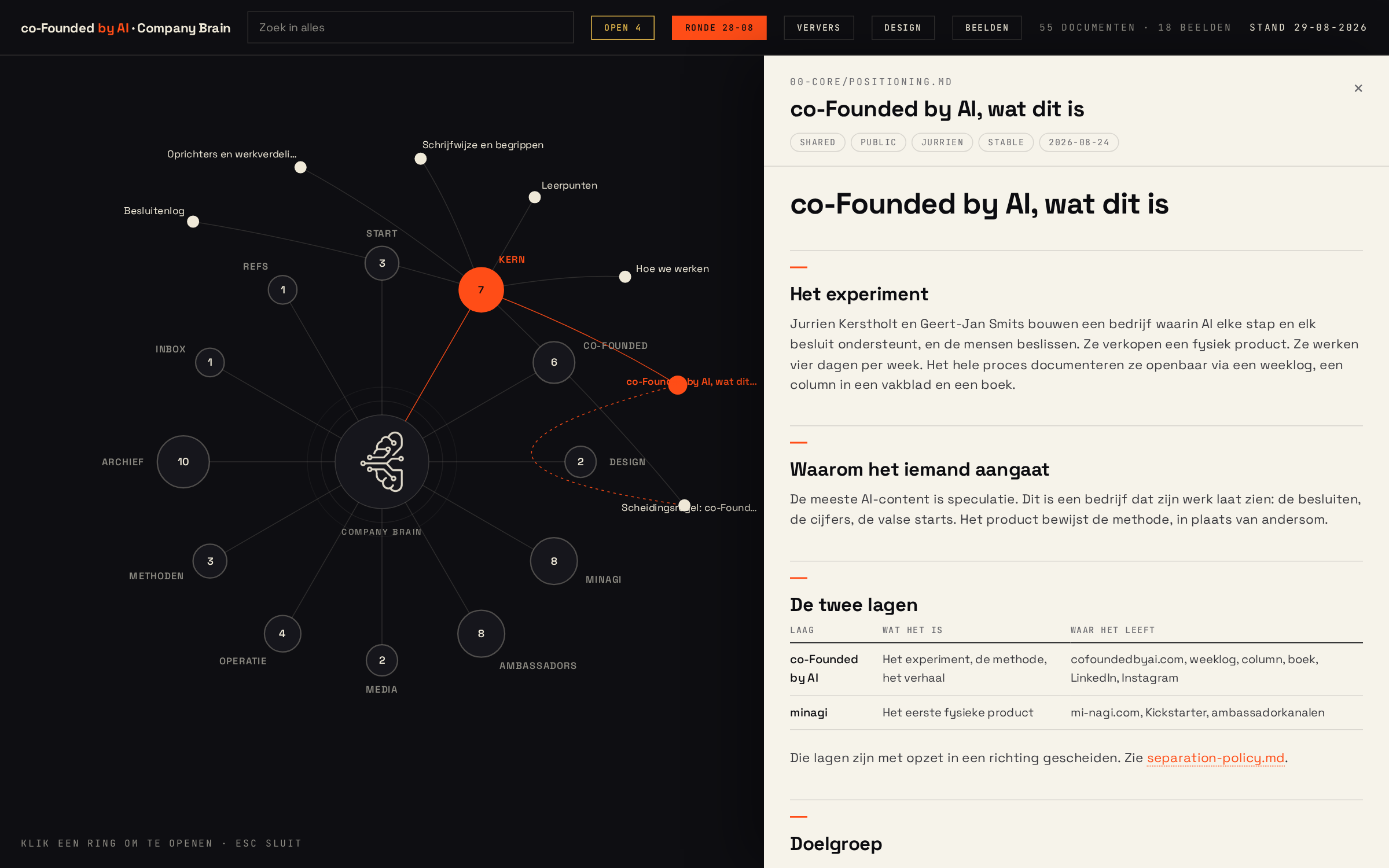
Since late August, that page reads the folder itself via the browser's file system API. Give permission once, then it refreshes itself every time you open it in the background.
Three things we learned
Keep it simple. Add a file first, then a folder. A structure everyone remembers beats a structure that looks neat.
Storing everything in it makes the output worse. Raw chat logs from four models deliver contradictory and outdated context, and the model then picks the wrong version of your positioning. The filter sits in the distillation step: only decisions, facts and lessons learned go into the brain.
Keys belong elsewhere. Passwords and tokens live in environment variables. The brain is text you share, and a key doesn't belong in that category.
Start small
You don't need dozens of documents to start. Three will do: who you are, who you work for and how you sound. Put them in a shared folder, point your AI tool to that path and write one line in your instructions: read this folder first.
The rest grows by itself, fifteen minutes every Friday. Within a month you'll notice the difference in the first paragraph a model gives you back: it sounds like you, without you asking.